
Touhou Koumakyou New Classic Shot, bomb, focus, deathbomb
Map the four inputs that decide whether a pattern is readable or a misclick.
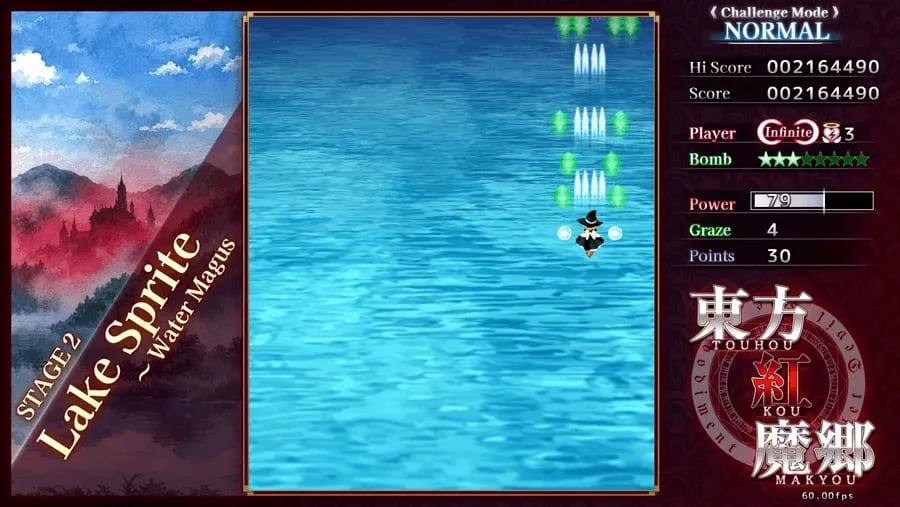
Touhou Koumakyou New Classic is a four-button game. Movement, shot, bomb, and focus are the entire fight. Set them before Stage 1. This page covers keyboard defaults, gamepad remaps, what focus does in New Classic, the deathbomb window, Classic’s extra confirm button, and console notes for Switch and PlayStation 5.
If you have not booted the remaster yet, start with Getting Started. Shot properties are on the shot type ranking. Use practice to drill binds without burning a credit.
Keyboard defaults
New Classic follows the long-running Touhou keyboard layout, with WASD as a first-class movement option:
- Movement: arrow keys or WASD
- Shot: Z (hold to fire; there is no separate auto-fire key)
- Bomb: X
- Focus: Shift
- Pause / menu: Esc
Menus typically confirm with Z and cancel with X, the same pair you use in play. Do not bind bomb to a key you mash while navigating. If Z sits far from Shift on your layout, remap in Options → Key Config. A right-handed shot/bomb cluster (Z/X) with left-hand movement is the intended posture. Do not put shot on Space unless you already play that way — Space is easy to bounce, and a bounced bomb is wasted.
Hold shot. Tapping Z drops damage and slows power collection. Hold focus when you need the hitbox and slow speed; release it to stream, misdirect, or race the collection line. Switching mid-pattern is a skill. Practice that toggle on Rumia before you need it on Sakuya.
Focus, hitbox, and speed
Focus does two jobs in New Classic. It slows movement so you can thread gaps, and it draws the visible hitbox on your sprite. Classic, like 2002, does not show that box. Learn the drawn box in New Classic so the muscle memory still works if you later boot Classic.
Unfocused movement is faster. Use it to stream aimed shots, reach the collection line after a cancel, leave a boss who is about to occupy your lane, and recover horizontally after a bomb. Focused movement is for static curtains, laser gates, and any card where the sprite would lie to you. New Classic’s boss markers help you track a target who left the visible area; they do not replace looking at the hitbox. If you die to a bullet you thought was a miss, you were unfocused or you trusted the art. Drop into focus and watch the box.
Bombs and the deathbomb window
X spends one bomb. Each shot type has its own: Reimu A Fantasy Seal, Reimu B Evil-Sealing Circle, Marisa A Stardust Reverie, Marisa B Master Spark. Bombs deal damage, cancel bullets, and grant invulnerability. They also void a spell-card bonus. Bomb when the alternative is a death, not when a pattern looks busy.
A deathbomb is a bomb pressed in the tiny window after a hit registers, before the life is actually spent. New Classic still honors that window — Steam ships an achievement named 8 Frames of Satisfaction. Eight frames at 60 FPS is about 0.13 seconds. Keep a finger on X when a pattern is about to collapse, and press on the flash, not after the death animation. If the life counter already dropped, you were late. Train this in Challenge Mode. Do not mash X after every graze; a planned bomb at the start of a broken pattern is cleaner than an 8-frame gamble at the end.
On death you drop power and reset bombs to the default stock. That is why a life is more expensive than a bomb: you lose damage, you lose the current bomb count, and you have to recapture 128 power. The walkthrough calls out where a bomb is cheaper than a death; this page is the input that makes that call possible.
Gamepad and Key Config
Steam’s New Classic build lists partial controller support. Open Options → Key Config and verify every action instead of trusting plug-and-play. Classic on Steam lists fuller pad support, and it adds an extra confirm-button option in key config so menu accept is not glued to shot. The two programs do not share binds. Set both if you bounce between versions.
A sane pad layout: D-pad for focused micros (stick is fine for unfocused streaming if it has no drift), a face button to hold shot, a different face button for bomb, a shoulder or trigger for focus, Start to pause. Disable stick-click. Invert nothing. This is a vertical shmup; up is up.
Nintendo Switch, Switch 2, and PlayStation 5
On Switch, Switch 2, and PlayStation 5, put shot and bomb on face buttons you can hold and put focus on a shoulder. Docked Pro Controller or DualSense with the D-pad is more precise than tiny analog sticks. Adaptive triggers do not help you graze. Sit close enough to see the hitbox New Classic draws. Consoles still include Classic with Standard; set Classic’s extra confirm button before you import a 1.02h save. Version differences are in New Classic vs Classic.
Spend ten minutes in Spell Practice holding Z without stutter, streaming unfocused then tapping Shift, bombing once to see invuln length, and deathbombing until the 8-frame press is reflex. When those inputs are boring, you are ready for Meiling. Jump to the walkthrough for where the bombs should actually go.
Frequently Asked Questions
Quick answers about New Classic, Classic, shot types, and Extra Stage.
What are the default keyboard controls?
Move with arrow keys or WASD, hold Z to shoot, press X to bomb, hold Shift to focus, and press Esc to pause. Remap anything awkward in Options → Key Config before a real credit.
What does focus do in New Classic?
Focus slows movement and draws your hitbox on the sprite. Classic does not show the box. Use focus for tight gaps; release it to stream, misdirect, or reach the collection line.
How does a deathbomb work?
After a hit, you have a very short window — the same 8-frame timing the Steam achievement name points at — to press bomb and cancel the death. Press on the hit, not after the life icon is gone. Train it in Challenge Mode.
Can I play New Classic with a gamepad?
Yes, but Steam New Classic is partial controller support, so open Key Config and verify shot, bomb, and focus. Switch and PlayStation 5 are built for pads. Keep bomb off the shot button.
What extra option does Classic add in key config?
Classic lets you assign a dedicated confirm button instead of relying on shot to accept menus. Set it before you import original 1.02h saves so you cannot back out of file select by accident.
Should I use the analog stick on Switch or PS5?
D-pad is safer for focused micros. Analog is acceptable for unfocused streaming if it has no drift. Put focus on a shoulder so movement and hitbox display are independent.